ShopDreamUp AI ArtDreamUp
Deviation Actions



Suggested Collections


You Might Like…


Featured in Groups





Description
SPLITS-NGON TUTORIAL
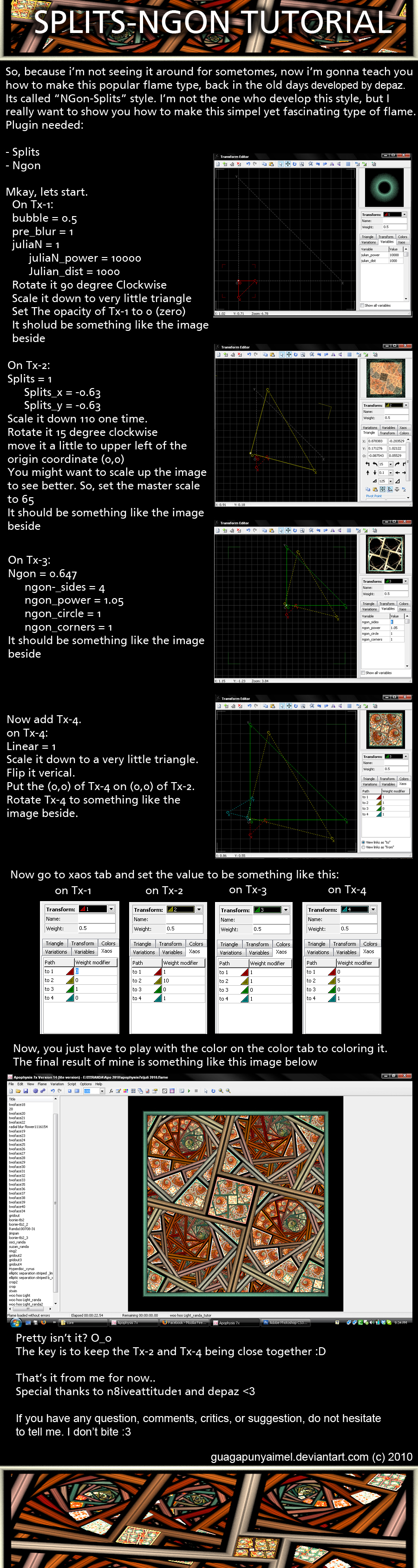
This is a tutorial on how to create the old days famous flame style, the "splist-ngon", first started and developed by ~depaz
Fave it if you like it.
And also i will be happy to see your result..
if you have any comments, critics, suggestions, or anything you would like to ask me, don't hesitate to do so. I'm not bite
- - -
P.S
Special thanks to `SuicideBySafetyPin and ~depaz
EDIT 1:
Thanks to `lindelokse who found the missing step on Tx-2. Thank you Chiara It is fixed for now
EDIT 2:
another missing part is, you have to set the opacity on TX-1 to 0 (zero). Thanks to ~IDeviant who found that missing step..
This is a tutorial on how to create the old days famous flame style, the "splist-ngon", first started and developed by ~depaz
Fave it if you like it.
And also i will be happy to see your result..
if you have any comments, critics, suggestions, or anything you would like to ask me, don't hesitate to do so. I'm not bite
- - -
P.S
Special thanks to `SuicideBySafetyPin and ~depaz
EDIT 1:
Thanks to `lindelokse who found the missing step on Tx-2. Thank you Chiara
It is fixed for now EDIT 2:
another missing part is, you have to set the opacity on TX-1 to 0 (zero). Thanks to ~IDeviant who found that missing step..
Image size
900x3374px 1.69 MB
Comments129
Join the community to add your comment. Already a deviant? Log In
thX